Practicalli Editor experiencesλ︎
Many different editors have been used throughout the journey into Clojure since 2010.
I first experienced Clojure at the London Clojurians code dojo events, first at Thoughworks and later at uSwitch hosted events too.
Emacs has been the main tool for my own needs, although now Neovim has become my preferred experience.
Emacs chorded key bindings was a skill I never mastered or developed an affection for and limited my initial adoption of Emacs until I discovered Evil and Spacemacs mnemonic key bindings
Emacs and Swankλ︎
In 2010 Cider had not been created, so Clojure REPL support was via swank-clojure, a Clojure specific implementation of server for Emacs SLIME. Syntax highlighting was provided by clojure-mode and structural editing via Paredit.
Emacs Swank and Slime tooling
SLIME and swank form a client server architecture to run and debug lisp programs. SLIME is the emacs frontend and swank is the backend. In between they create a network socket and communicate by sending across messages (S-expressions). In short it is just an RPC mechanism between emacs and the actual lisp backend.
The fact that the slime and swank are separate, are connected over a network and communicate via rpc messages means that they can be anywhere. So, slime can connect to a remote host/port to swank. All other forms you see (lein swank etc etc) do the same. They start swank on a port allowing for a remote connection of slime.
swank-clojure is the clojure port of swank. originally swank-clojure came with a helper elisp file called swank-clojure.el. The job of this file was to enable manual setup of swank parameters like the classpaths, jvm parameters etc. Since other tools like lein came along later, swank-clojure.el was deprecated. But it still lives on at: http://github.com/vu3rdd/swank-clojure-extra and provides the M-x swank-clojure-project which enables starting swank on a lein project.
SLIME originated in (and is still being actively developed for) Common Lisp. Infact, the clojure port of swank only has a subset of the features enjoyed by the original SLIME/swank versions. SLIME exists for all major variants of Common Lisp. There is a partial port of it for Scheme48. There are some partial implementations available under the contrib directory.
A custom configuration for Eamcs was created, with the help of the London Clojurians. The configuration has just enough to support coding at the code dojo events and very few other extra packages.
There was a lot to learn about Emacs and the biggest challenge was understanding and remembering the Emac chorded key binding, e.g C-x C-e to evaluate an expression, C-c C-k to evaluate the source code buffer, C-c C-d C-d to view docs for a var, etc.
Emacs with Clojure Swank overview - Stack Overflow 2010
LightTableλ︎

LightTable was a wonderful editor that was excellent for those learning the Clojure language.
LightTable was simple to use and feedback provided as you type each character. So if a closing paren is missing or something is out of place, then an error was shown until the code was fixed.
This instant feedback really helped me understand Clojure in the early part of my learning journey.
LightTable was first editor that really helped me feel comforatable with Clojure and REPL driven development.
The editor was not perfect, but was extremely simple to use and provided really useful feedback as code was typed.
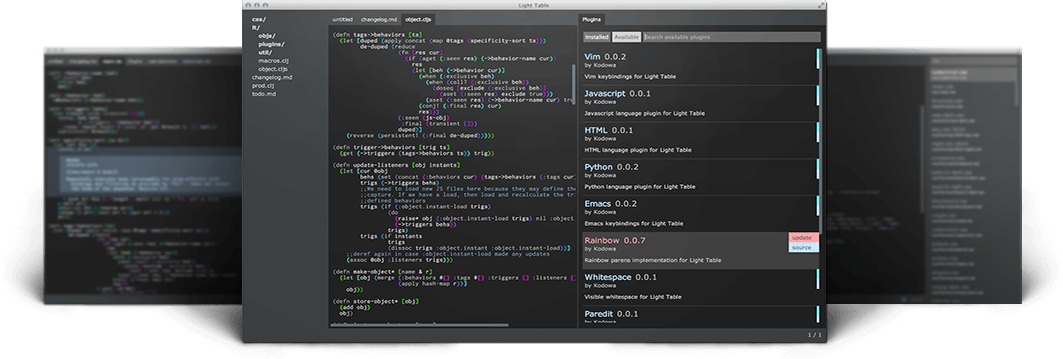
LightTable was first released ,,, with a final 0.8.1 release on 22 January 2016. (in time to try it out at the London ClojureX conference)
LightTable quickly became very popular with the community and at the time was the simplest editor to start Clojure with.

Unfortunately the LightTable editor was discontinued, even though there was an effort to revive it after the original maintainer passed.
Emacs Liveλ︎
Emacs & CIDER with cyberpunk theme
Personal Emacs config shared and contributed to by others.

Spacemacs - Emacs & CIDERλ︎
Contributed a range of key bindings to the Spacemacs project for Clojure, especially around evaluation.
TODO: list of contributions
repl.itλ︎
Klipseλ︎
Kipse is an embedded environment for evaluating ClojureScript code.
Supports JavaScript interop.
The runtime is ClojureScript, so there are a few clojure specific aspect that are not supported, e.g Java Interop.
Nightcode and Nightlightλ︎
Nightcode provided some interesting project templates, with a focus on games and mobile apps.

Nightcode - ClojureBridge user guide
Nighlight has replaced the original Nightcode project.
Parvim has replaced nightlight, using the same embedded principle as Nightlight but with a richer Vim-style editing experience and an OpenGL desktop app rather than a local web-server.
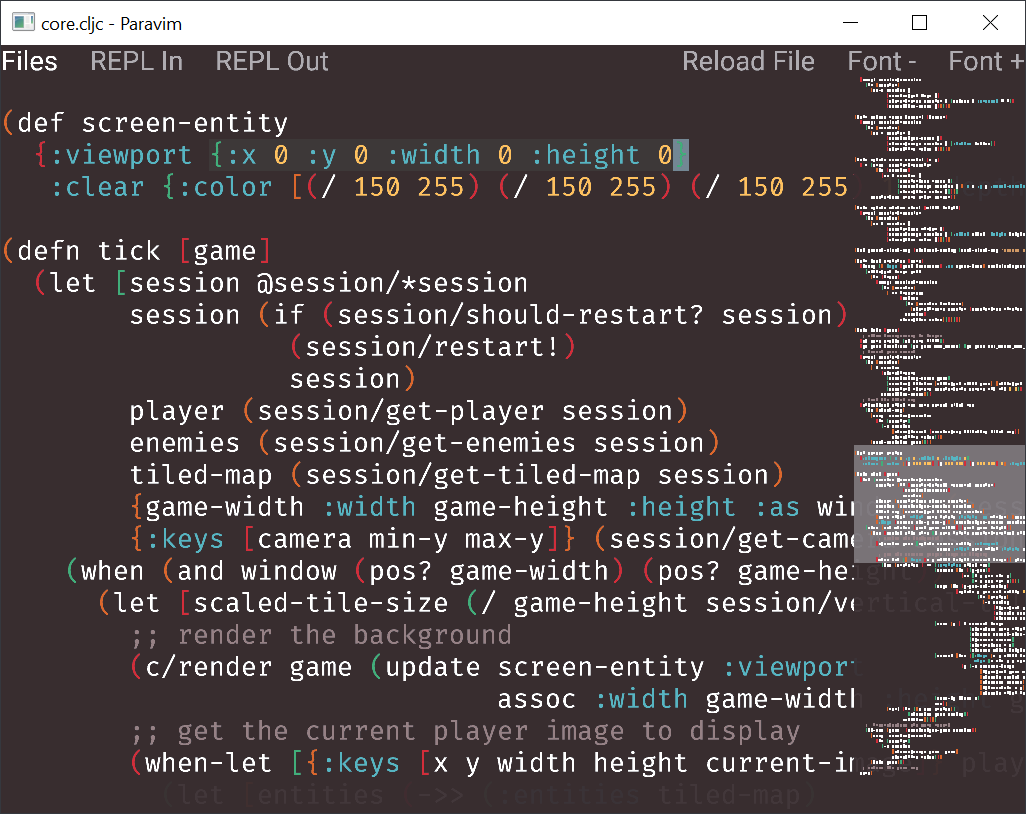
Minimal user documentation
These projects had a lot of promise, althought there were not enough documentation for students or volunteers to pick up the editors quickly. If there is time to read the source code then there are many interesting features in each of these projects, especially Paravim.
The projects were not completed, although do still provide some useful functionality.
Maria.cloudλ︎
Maria.cloud learning page - ClojureBridge London
VS Code & Calvaλ︎
VS Code was a common choice for many students attending the ClojureBridge London events, so learning to be effective with Calva was very useful.
I created a essentials cheatsheet for each editor to support the students.
I found Calva really simple and easy to use for small projects and challenges.
The Live feature of VS Code was the best collaboration tools I have seen within an editor. Unfortunately trying to get experience developers to use VS Code for collaborative coding was a major blocker. So
Managing VS Code itself wasnt as key board driven as Emacs and there was no direct support for Multi-mode editing (which I had adopted from a few years of Spacemacs). This mean the experience of Calva was hampered by the limitations of VS Code.
The VSpaceCode demonstrated I was not the only person feeling the pain of keyboard control of VS Studio. VSpaceCode is a well considered approach to driving everything from the keyboard. I contributed key bindings for Clojure mode, calling the Calva commands. It was a huge json file, so not very nice to edit (although VS Code did help a little).
Calva was one of the first tools to implement Language Server Protocol and it was quickly integrated into the editor. This really helped drive the development of Clojure LSP, although it also did move fast and break a lot of things and use huge amounts of memory. I quickly stopped using Calva as this approach wasnt effective for me, although I assume helped those who were actively developing Calva.
When switching to Clojure CLI I found Calva less convienient to use, as it does not directly support Clojure CLI user aliases.
when calling jack-in it lists the available aliases in the project, but there was not a way to add a user alias to the jack-in command (as could be done with CIDER).
The only way to include a user alias was to create a json mapping in the Calva config. Given the size of my user configuration, this seemed to be a show-stopper for me.
When I use Calva with Clojure CLI, I start a REPL from a terminal and then I am free to use which ever user and project aliases I prefer. Then I can use Calva connect to the REPL process running in the terminal.
There wasnt any advantage in using VS Code and Calva for my own workflow, and a slight disadvantage once I swiched to Clojure CLI.
Emacs-Doomλ︎
Many people were comenting on how much faster Doom Emacs was, so I spend 3 months working with it.
I had used Emacs Live before so I was comfortable with using a config driven mainly by one person as Doom Emacs is.
The Clojure setup in Doom Emacs was simple, althogh the experience and available key bindings were more limited than in Spacemacs.
Doom also did not have a layouts feature which I had heavily using in Spacemacs. There was a way to open projects, although there was not always a clear demarkation between project buffers, so things could easily get a bit messy.
Although Doom Emacs config starts up really quickly, by the time it had loaded the few projects I typically work on it was not noticably any faster than Spacemacs. In regular editing use, there was no perception of Emacs running faster.
Practicalli Doom Emacs Config was created to share all the key binding definitions I had created (mostly copying from those I had contributed to Spacemacs). As there were significant changes to the existing Doom Emacs key bingings, I did not submit a PR to add my changes. I did share my config with the community to allow them to see if there were useful commands and key bindings to adopt.
After the 3 months I didnt feel Doom Emacs offered any benefit to my workflow. Startup time is irelevant to me so long as its less than 10 seconds (I spend more time coughing first thing in the morning). I only close Emacs when I shut down the computer.
Neovim & Conjureλ︎
I started a role as Data Engineer & Architect and the team was very Neovim centric.
Neovim has started including Treesitter support and LSP client support, so it was a good time to dive into Conjure and start coding in a terminal.
Kitty terminal was adopted and still used today. Kitty is available for Linux and Mac and the same config works well for both (once Nerd fonts are installed)
Initially a fennel based config was used, base on ...
More features were desirable, to make it more of an experience I was used to.
There was a challenge understanding how to do some of the basics of an editor, like creating and saving new file.
After about 6 weeks in between getting work done, I had a very nice setup, although it was much more limited and not as smooth as the Spacemacs experience.
Adopting AstroNvim community configuration really improved the Neovim experience and removed many of the shortfalls I had experienced with my own Fennel config.
Adding Clojure via an AstroNvim Community pack was relativley easy, reusing some of the lessons learned from the fennel config. The pack included Conjure and parinfer.
Parinfer was a little strange at first, but quickly became more natural than using paredit. Many of the structural editing features of paredit can be done with multi-mode editing commands, reducing the amount of information to retain for Clojure code wrangling.
Neovide is a GUI layer on top of Neovim that provides additional polish to the experience. Neovide can be started from the Desktop launcher without opening a terminal. Using the telescope projects plugin allows Neovide to quickly swtich to the right project via the telesope list.
Emacs Corgiλ︎
Core Clojure support for Emacs.
Centralised key binding definitions configuration
Too minimal for my worklfow and no interest in supporting Clojure LSP at the time of review.