Clojure CLI Config
Practicalli Clojure CLI Config provides a wide range of community tools that extend the features of the Clojure CLI, for use across all Clojure deps.edn projects.
clojure -X:deps aliases will list all the alias names at the project and user level.
Aliases are qualified keywords using descriptive names to clearly convey purpose and provide a level of consistency to minimise cognitive load.
deps.ednuser configuration containing alias definitions- GitHub workflow that runs MegaLinter and Code Quality checks (clj-kondo and cljstyle via the setup-clojure action)
- cljstyle configuration that follows the Clojure Style Guide, using the .cljstyle configuration file
- Rebel Readline example configuration (supports the Rich Terminal UI used by Practicalli)
deps-deprecated.edncontaining alias examples of tools not currently used by Practialli which may still be of interest to the wider community




Sponsor Practicalli

All sponsorship funds are used to support the continued development of Practicalli series of books and videos, although most work is done at personal cost and time.
Thanks to the official Clojure team,  Nubank and a wide range of other sponsors from the community for there continued support
Common development tasks
- Built-in: tasks provided by Clojure CLI
- Practicalli: aliases provided by Practicalli Clojure CLI Config
| Task | Command | Configuration |
|---|---|---|
| Create minimal playground project | clojure -T:project/create |
Practicalli |
| Clojure REPL - rebel readline & nrepl server | clojure -M:repl/rebel |
Practicalli |
| ClojureScript REPL with nREPL server | clojure -M:repl/cljs |
Practicalli |
| Run tests / watch for changes | clojure -X:test/run / clojure -X:test/watch |
Practicalli |
| Run the project (clojure.main) | clojure -M -m domain.main-namespace |
Built-in |
| Check library dependencies for newer versions | clojure -T:search/outdated |
Practicalli |
| Download dependencies | clojure -P (followed by optional aliases) |
Built-in |
| Generate image of project dependency graph | clojure -T:project/graph-deps |
Practicalli |
| Deploy library locally (~/.m2/repository) | clojure -X:deps mvn-install :jar '"project.jar"' |
Built-in |
| Find library names (Clojars & Maven Central) | clojure -M:search/libraries qualified-library-names |
Practicalli |
| Find available versions of a library | clojure -X:deps find-versions :lib domain/library-name |
Built-in |
| Resolve git coord tags to shas and update deps.edn | clojure -X:deps git-resolve-tags git-coord-tag |
Built-in |
-Mfor:main-optsconfiguration-Xfor:exec-optsconfiguration-Tfor:exec-opts, ignoring project dependencies
Practicalli books uses the Clojure CLI Config extensively to support a REPL Reloaded workflow for Clojure projects.
Practicalli Clojure book discusses Clojure CLI and its use, along with video walk-through of the key features.

Install
Clojure CLI version 1.11.1.xxxx or later is recommended. Check the version of Clojure CLI currently installed via:
Practicalli guide to installing Clojure has detailed instructions to install Clojure CLI for a specific operating system, or follow the Clojure.org Getting Started page.
When Clojure CLI runs for the first time a configuration directory is created in $XDG_CONFIG_HOME/clojure or $HOME/.clojure if XDG_CONFIG_HOME not set
Practicalli recommends setting
$XDG_CONFIG_HOMEto$HOME/.config
Backup or delete the Clojure CLI configuration directory if it exists
Clone practicalli/clojure-cli-config repository (or create a fork and clone that instead)
If $XDG_CONFIG_HOME not set, then use
git clone git@github.com:practicalli/clojure-cli-config.git $HOME/.clojure
The deps.edn file in the Clojure CLI configuration directory contains all the Practicalli aliases, which are available from any Clojure CLI project for the current user account.
Windows support: Windows Sub-system for Linux (WSL) is strongly encouraged. Aliases should also work on Powershell or cmd.exe, although escape quoting of additional arguments may be required.
Location of local Maven repository
$HOME/.m2/repository is the default location of the local maven repository, the directory where library dependency jar files are cached.
:mvn/local-repo is a top-level key to set the local maven repository location, such as /home/practicalli/.cache/maven/repository to follow the XDG specification. If setting :mvn/local-repository, consider moving the contents of $HOME/.m2/repository to the new location to avoid downloading currently cached jar files (or use this as an opportunity to clear out the cache).
Update the Config
The collection of aliases is regularly reviewed and additional alias suggestions and PRs are most welcome.
The versions of libraries are updated at least once per month using the :project/outdated alias, updating the deps.edn file. The antq tool is used to report new library versions, sent to an org file which is then used to update the changelog.
Pull Requests from
:search/outdatedcannot be accepted unless full testing of every change can be demonstrated
Using the Aliases
A directory containing a deps.edn file is considered a Clojure project. A deps.edn file can contain an empty hash-map, {} or hash-map with configuration, usually :paths and :dependencies and perhaps some :aliases.
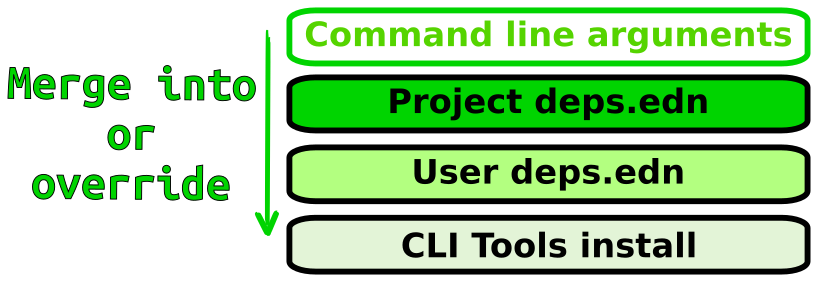
The project deps.edn file is merged with the user wide configuration, e.g $HOME/.clojure/deps.edn, with the project deps.edn keys taking precedence if there is duplication, otherwise they are merged.
Configuration passed via the command line when running clojure or the clj wrapper will take precedence over the project and user level configuration if there is duplication, otherwise they are merged.
See the rest of this readme for examples of how to use each alias this configuration contains.
Common arguments are included in alias definitions via main-opts and :exec-args to provide a default behaviour and simplify the use aliases.
Aliases are defined to be used with all execution options -A, -M, -P, -T or -X where possible.
-Mfor:main-optsconfiguration-Xfor:exec-optsconfiguration-Tfor:exec-opts, ignoring project dependencies
| Task | Command | Configuration |
|---|---|---|
| Create minimal playground project | clojure -T:project/create |
Practicalli |
| Clojure REPL - rebel readline & nrepl server | clojure -M:repl/rebel |
Practicalli |
| ClojureScript REPL with nREPL server | clojure -M:repl/cljs |
Practicalli |
| Run tests / watch for changes | clojure -X:test/run / clojure -X:test/watch |
Practicalli |
| Run the project (clojure.main) | clojure -M -m domain.main-namespace |
Built-in |
| Check library dependencies for newer versions | clojure -T:search/outdated |
Practicalli |
| Download dependencies | clojure -P (followed by optional aliases) |
Built-in |
| Generate image of project dependency graph | clojure -T:graph/deps |
Practicalli |
| Deploy library locally (~/.m2/repository) | clojure -X:deps mvn-install :jar '"project.jar"' |
Built-in |
| Find library names (Clojars & Maven Central) | clojure -M:search/libraries qualified-library-names |
Practicalli |
| Find available versions of a library | clojure -X:deps find-versions :lib domain/library-name |
Built-in |
| Resolve git coord tags to shas and update deps.edn | clojure -X:deps git-resolve-tags git-coord-tag |
Built-in |